
Most of what we write here is evergreen: how to run a trial follow-up, what belongs on an owner's weekly report, where belt test prep disappears to. This one is dated on purpose. It is the list of what changed in QuickKicks this fall, why each piece changed, and what it means for the people who use it. For most of these, that is a parent holding a phone in a car park five minutes before class.
The parent app, rebuilt around a parent's questions
The old parent app was organized the way office software is organized: students, classes, payments, documents. That is a filing cabinet, and it is the wrong shape for someone standing in a doorway. A parent opens the app to answer four questions. Is anything wrong? Where do I need to be, and when? How is my kid actually doing? And where is that one form I was supposed to sign? So the app is now built in that order.
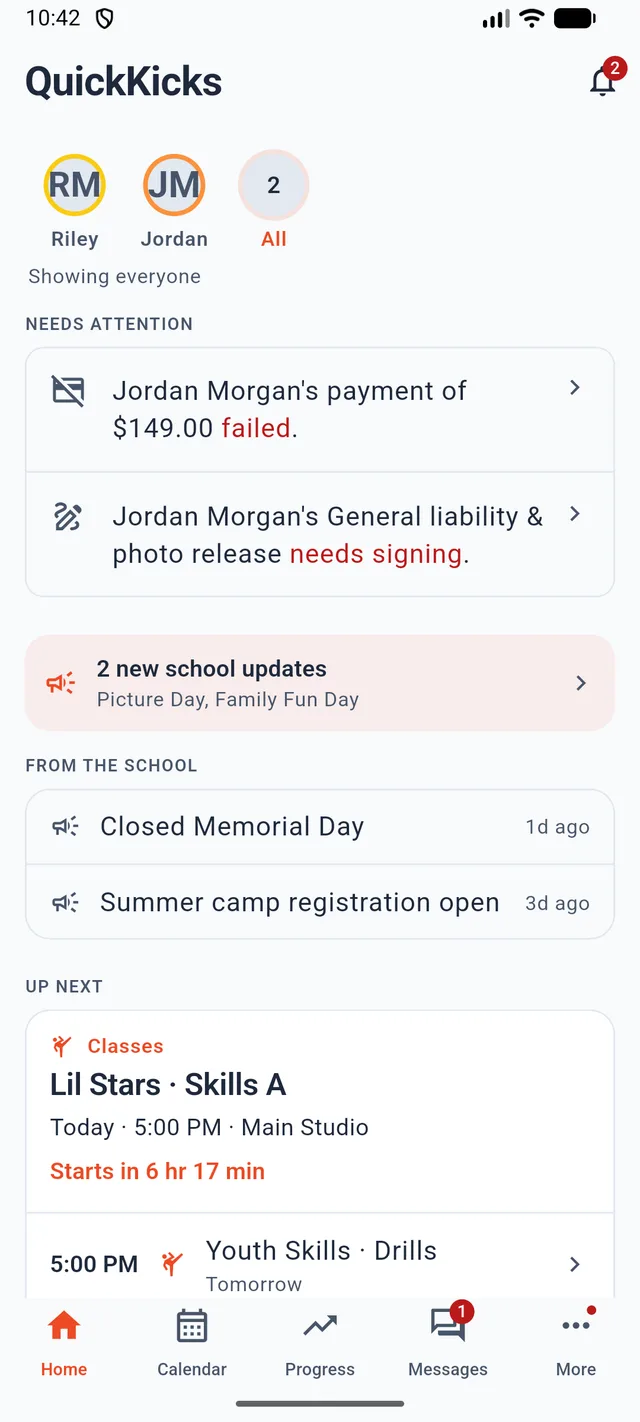
Home answers “is anything wrong?” first
A failed payment and an unsigned waiver are the two things a parent would genuinely want to be told about, so they sit at the top under Needs attention, named and tappable. Below that are the school's recent announcements, then what is coming up. A family with more than one child gets a switcher at the top; a family with one child never sees it, because it would be a control with one option.
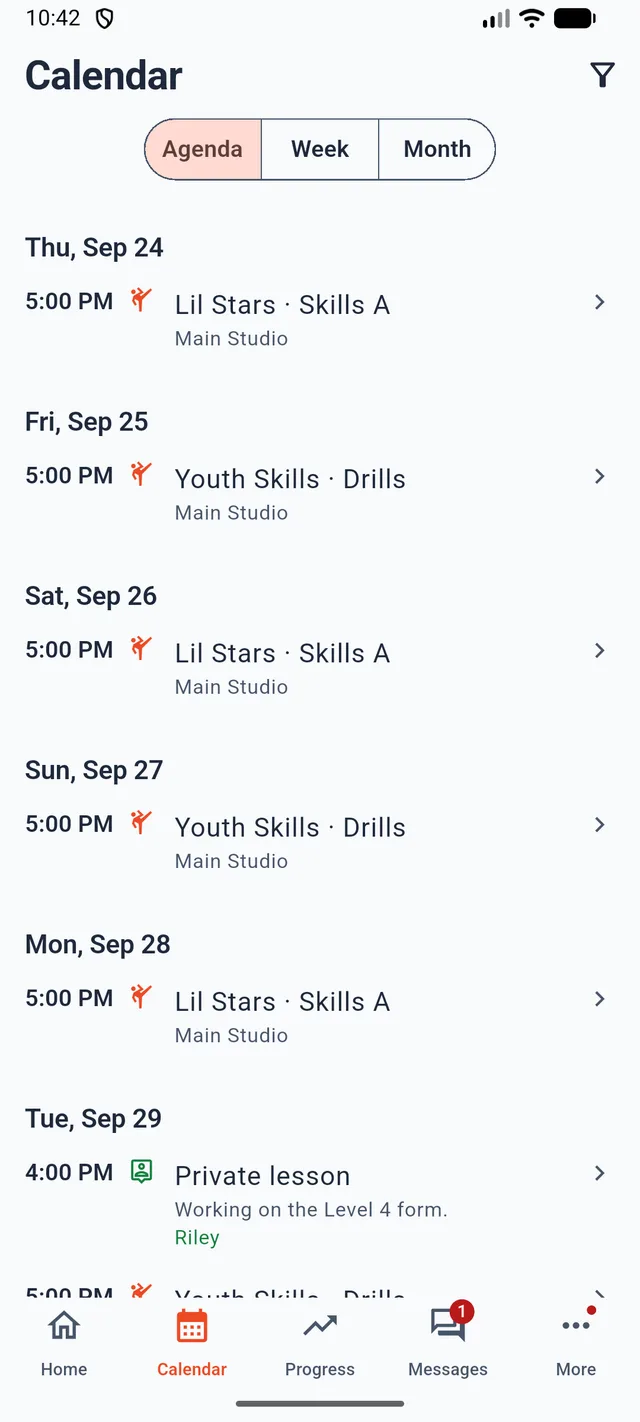
One calendar, not five lists
Classes, school events, private lessons, belt tests and birthday parties used to live on separate screens, which meant a week containing a booked private lesson and a registered belt test could look empty from the home screen. They are now one feed, rendered as agenda, week or month, and each entry says what kind of commitment it is. A lesson you booked and paid for does not look like an open house nobody signed up to. Where an entry belongs to a particular child, it says whose it is.
A calendar that is missing the one thing you paid for is worse than no calendar, because you stop checking the other things.
Progress shows the actual requirements
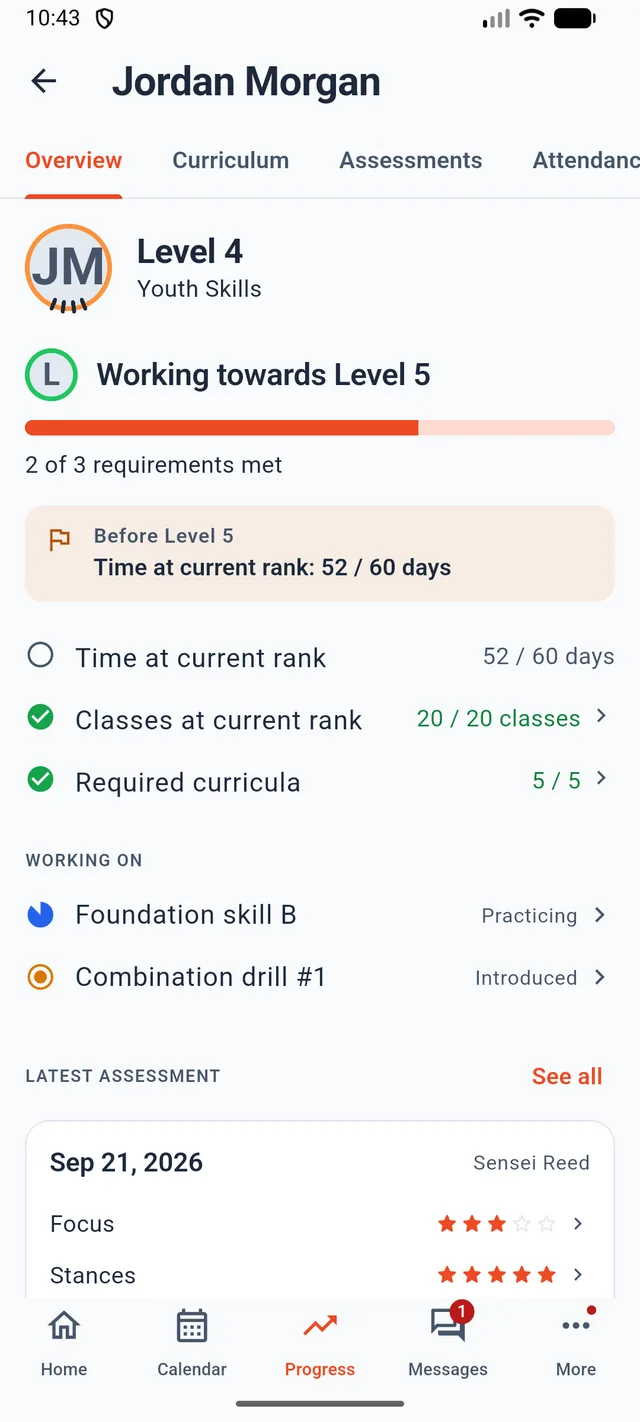
The old progress screen showed a percentage bar. A percentage of what was never explained, which made it decoration. The screen now shows the school's own promotion gates as separate lines (time at current rank, classes at current rank, required curriculum items), each with its real numbers and whether it is met. Readiness is the count of gates met over gates total, so the number and the list always agree.
Under that sits the instructor's most recent assessment with its per-category ratings, and the curriculum the child is working on right now with its status. Where staff have attached a demo video or a handout to a technique, the parent sees it, locked to the child's rank so a green belt's sheet does not leak the brown belt syllabus.
The rest of the account, grouped by errand
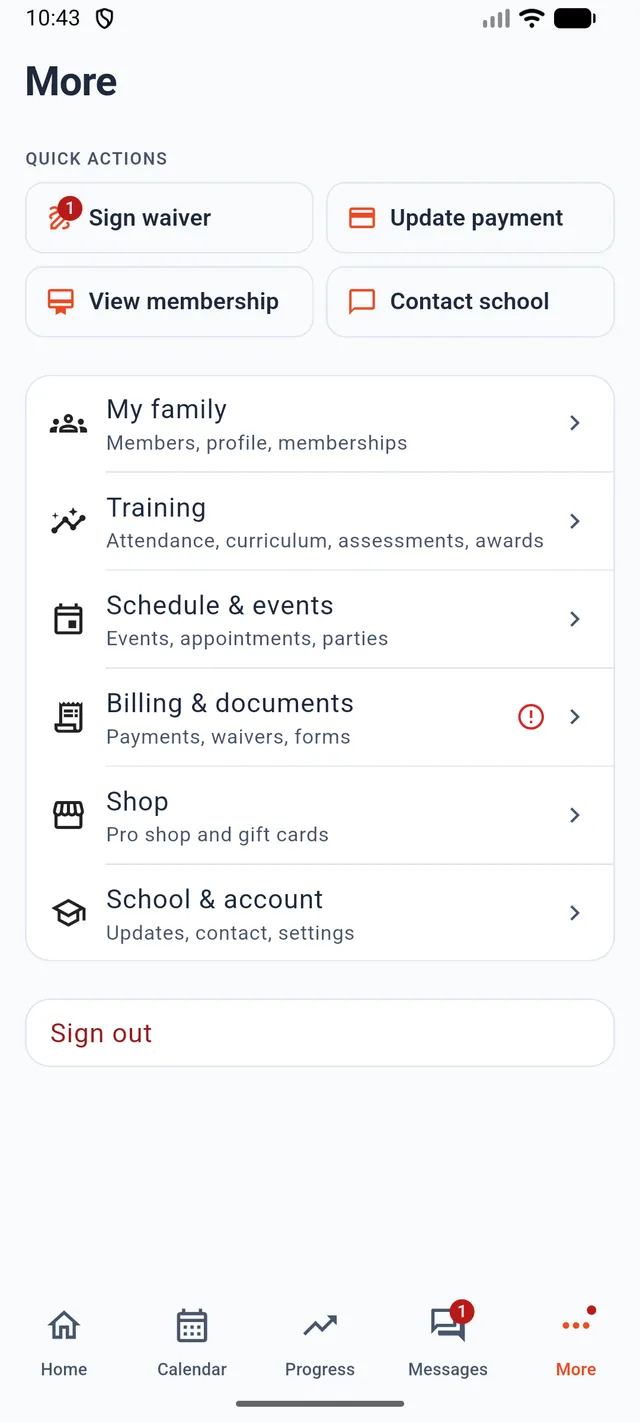
Waivers, payment methods, invoices, memberships, attendance history, awards, the pro shop and gift cards are all still there, now grouped under More by the errand you came to do rather than by which database table they belong to. Two other fixes worth naming: every empty state now says what would fill it instead of showing a blank panel, and a parent can finally see the emergency contact and doctor the school holds for their family, which was data we stored and never showed them.
On checkout, the app used to open a payment page and report success without checking whether the page had actually opened. It now confirms the amount with you first, opens checkout inside the app, and tells you if it failed. The whole app is available in Spanish and follows the phone's language setting.
A staff app for the floor
The console is built for a desk. Plenty of the job is not done at a desk, so there is now a QuickKicks app for staff, on phone and tablet, coming to the App Store and Google Play next.
- Today is the screen you land on. Who is teaching what, which sessions still need attention, the day's birthdays, and a time clock that punches in and out from the same screen.
- People, not a dashboard. The second tab is the roster, because looking someone up is the single most common reason a staff member opens it mid-class.
- A real calendar. Day, week and month, with sessions drawn inside the day columns the way a desktop calendar draws them, rather than a date strip over a list.
- Changes you can make from the mat. Membership changes and session cancellations no longer wait until someone is back at the front desk.
On a tablet the list and the detail sit side by side rather than pushing a new full-screen page, which is true of the parent app now as well.
Kiosk check-in that survives a dead connection
A check-in tablet that stops working when the internet drops is worse than a paper sheet, because the class runs anyway and the attendance is simply lost. Kiosk check-in now keeps an offline snapshot of who is expected and queues check-ins locally, sending them when the connection returns.
- Barcode and PIN entry, so a student with a card and a student without one both check in the same way.
- An undo, because a mis-tap on a shared tablet is inevitable and should not need a staff login to fix.
- A waiver gate that stops an unsigned member at the door and offers the signature there, instead of surfacing the gap a month later.
- A PIN-protected exit, so the tablet stays on the kiosk screen instead of becoming a browser.
Tournaments: panel judging, and a queue you can see
Hosting a tournament went from a scoring app to a whole event system this season. Scoring now runs proper panel judging: three to five judges, scores from 5 to 10, and ties settled by a backup kata rather than by whoever argues longest. A panel cannot award a medal on unequal denominators, which is the bug class that quietly ruins a division.
- Run day. No-shows, walkovers, tiebreaks and walk-ins slotted into open byes are all first-class, because all four happen at every tournament.
- A Last Result card on the ring screen, so an undo is one tap rather than a hunt.
- A stalled ring is visible from off the floor, so the organizer finds the jam instead of hearing about it from a parent.
- Divisions build themselves from a CSV import, and can be dragged between rings or moved to another day without redrawing brackets by hand.
- A spectator surface that answers a parent's question: which ring, roughly when. Reachable from a QR poster you print and tape to the wall.
- Your own domain and branding on the public registration site, with promo codes, comps and refunds handled in the console.
The judge and spectator screens are localized, and the organizer console was rebuilt visually along with the rest.
Events and registration
Two things schools kept asking for. Events can now carry tiered price options (early bird and regular, member and non-member, spectator and competitor) instead of one price and a note in the description. And registration forms take choice questions, so shirt size or division preference is collected at registration rather than chased over email afterwards. Those answers are required from the phone too; the app used to register blank.
Event flyers you upload now show up on the parent portal and the public event page, and land on a bulletin board in the app, so a parent who was never emailed still sees them.
Communication you can verify
- Opens and clicks are recorded, so you can see who actually read the belt test notice rather than treating the send as the outcome.
- Do Not Email is set by a person. Until now the only thing that suppressed an address was a bounce webhook. A parent can ask at the desk and have it honored.
- Verify your own sending domain from settings, and when it is not verified the page tells you which DNS record is wrong rather than just failing.
- Postcards with your own artwork. Upload a design, or use the copyable prompt to generate one. US addresses only for now.
Reporting and records
- Churn rate as a first-class report, next to the revenue numbers it explains.
- App usage, so you can see which families are actually on the parent app before you decide the app is how you will announce something.
- Signed waivers export as a zip, which is what you need the day an insurer or a lawyer asks, and what no amount of clicking through one record at a time gives you.
- Printable blank score sheets for skill assessments, for instructors who would rather grade on paper and enter it afterwards.
- Rescoring keeps the first score. Correcting an assessment no longer silently overwrites what was originally recorded.
- Dark mode across the staff console, for the desk that faces a window and the one that does not.
A large part of this season also went into moving the backend onto a faster stack. That is not a feature and you should never have to think about it, which is why it is mentioned only at the end.